A schedule that tells you what actually happened
Most guard scheduling software stops at the plan. Watchbill keeps going: it links each clock-in to the shift it belongs to and reports the difference — missed, arrived late, left early, off-site — to your supervisors and to you, while there's still time to do something about it.
Free 30-day trial with no card required. $7/guard per month, everything included.
Build the roster in minutes, not evenings
Create a one-off shift by picking the site, the hours and the guards — one shift per guard, because accountability is per person. Or define a recurring pattern (Mon–Thu, 22:00–06:00, in the site's local time) and Watchbill fills the next four weeks automatically and keeps extending it every night. Overnight shifts and daylight-saving changes just work.
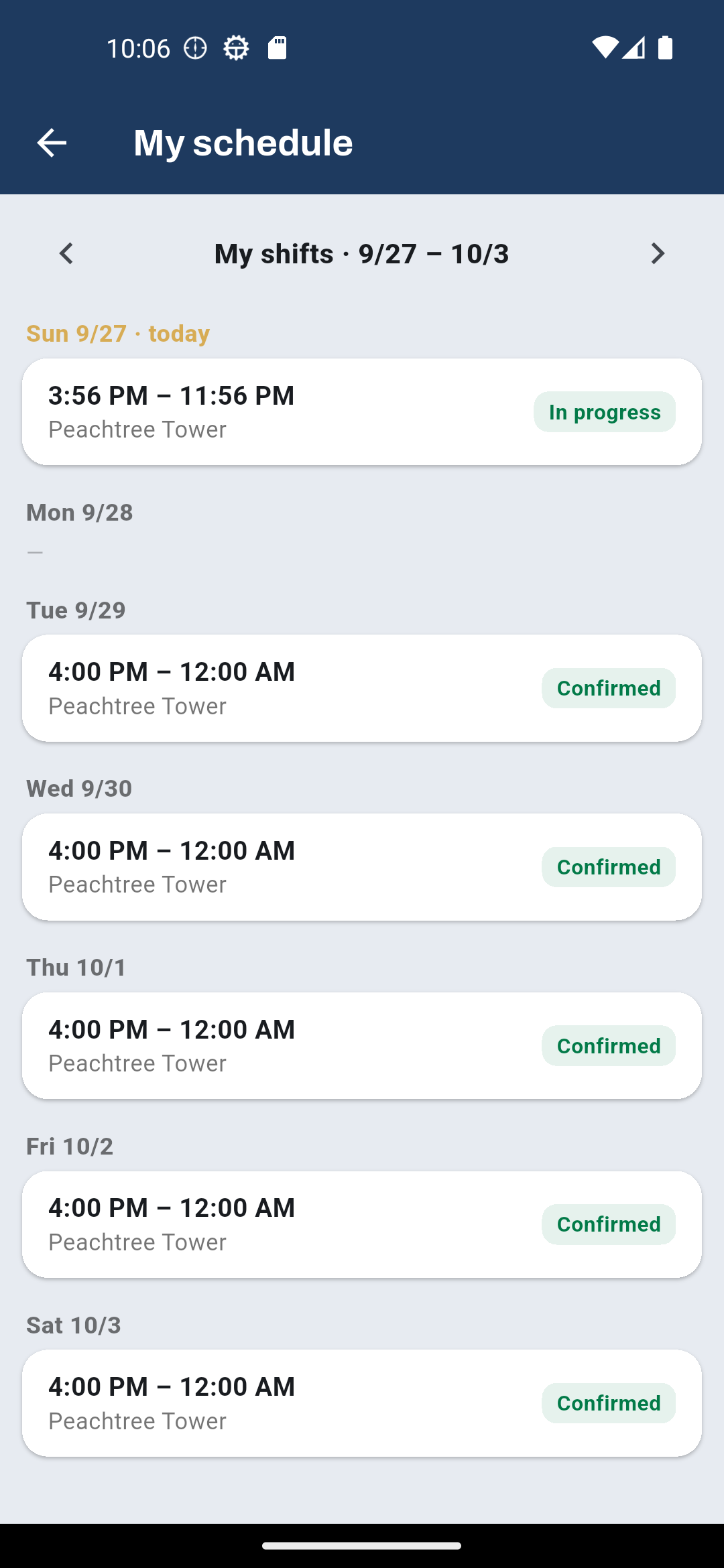
There is no draft-and-publish step to forget. A shift with a guard on it is live the moment you save: it appears in their Field App, and a push reminder goes out before it starts.
- Multiple guards at once — each gets their own series, so one can be paused or changed without touching the others
- Assignment warns you when the guard's license would be expired on that date
- Disable a guard who leaves and every upcoming shift is released as an open shift for you to refill
Open shifts fill themselves
Leave a shift or a whole series unassigned and it becomes an open shift. Guards who are eligible see it in the app and tap Bid. You see the bid count on the row, approve one, and Watchbill notifies the winner and declines the rest. Saturday coverage stops being a phone tree.
Time off and availability, without the group text
Guards request time off from the app — vacation, sick, personal — and you approve or deny from the Shifts page. Approving over shifts they already hold shows you exactly which ones, then unassigns them and opens them for bids, so the posts are covered by someone else instead of quietly going missing. The office can enter time off for a guard too, approved on the spot, for the phone call at 5 a.m.
Availability is the standing pattern: never Sundays, weekdays not before 3 PM. Set by the guard or by you, no approval needed. Both hide shifts from the guard's open-shift list, block bids, and warn you in the assign dialog — a warning you can override, never a wall. Recurring shifts honour it: an occurrence that lands on a vacation day is created open instead of assigned.
Change one day without breaking the pattern
A guard calls in sick on a Tuesday. Tap Change guard on that one row: the outgoing and incoming guards are both notified, any open bids on that day are declined, and the rest of the series is untouched. Edit a day's hours, or cancel it, the same way — the day you touched is detached, so later edits to the series never overwrite what you set. History is never rewritten.
Status that means something
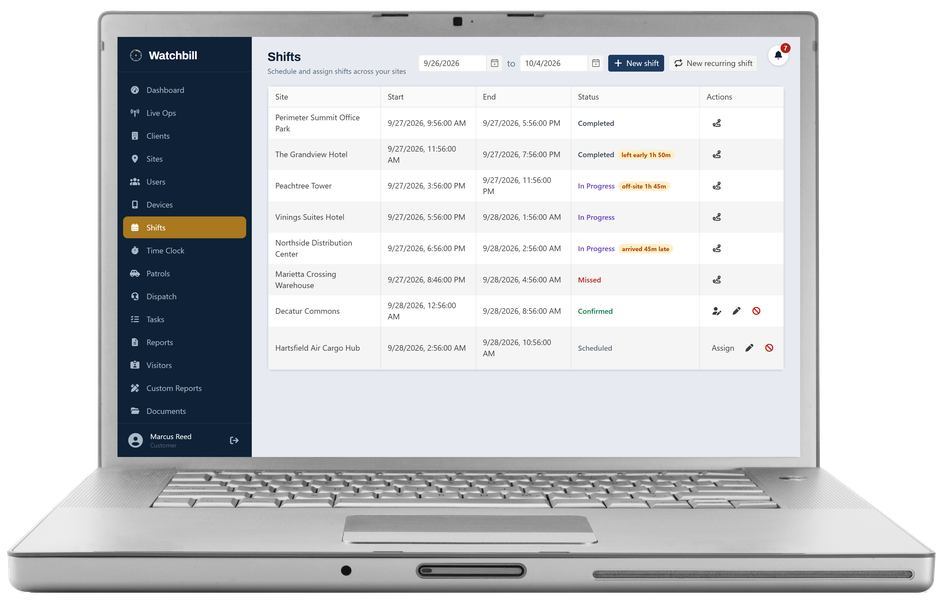
Every shift carries one of six states, and the last four are earned, not declared. Scheduled — open, no guard yet. Confirmed — assigned. In progress — the guard has clocked in at that site. Completed — clocked out at end of shift. Missed — the grace period passed with nobody there. Canceled — you canceled it.
Guards never "start" a shift. They clock in, and Watchbill links the clock-in to the right shift on its own — same guard, same site, up to two hours early. The link is what drives the status, so the status can't be gamed from the phone.
Missed, late, left early — flagged the moment it happens
Fifteen minutes after the start (your grace period) with no clock-in, the shift is marked Missed and the site's supervisors and the company owners are notified. If the guard turns up at 23:05 for a 22:00 shift, the row changes to arrived 1h 5m late and a late-arrival notice goes out — so a shift still reading Missed at the end of the night means nobody ever came.
Actual times are compared with scheduled ones. Beyond your tolerance, the row shows late 42m or left early 1h 10m, hover shows the real times, and supervisors hear about it at the moment it happens — not from the client on Monday. A guard who clocks in fifteen minutes before the end no longer passes for a worked shift.
Where the site has a boundary geofence, the row also shows off-site 2h 10m — the minutes the guard spent outside the property while clocked in — with a map trail behind it. That is the variance a time clock alone can never see.
- A clock-in at the wrong site is adopted so the shift isn't falsely missed — and reported to supervisors as exactly that
- Open shifts nobody claimed are never flagged; only assigned shifts can be missed
- The dashboard's "Missed shifts (7 days)" counts true no-shows only
Tuned to your company, quiet by default
Grace period, early clock-in window and late/early tolerance are company settings with sensible defaults (15 minutes, 2 hours, 15 minutes). Alerts go to the supervisors assigned to the site and, by default, to every owner — so a site with no supervisor still alerts someone. Push on the Command app, and in the web app's notification bell.
Questions owners ask
Do guards have to "accept" a shift?
No. An assigned shift is confirmed and on their schedule immediately, with a reminder before it starts. Acceptance is what open-shift bidding is for.
What if a guard clocks in early?
Up to two hours before the start (configurable), the clock-in links to the upcoming shift and counts as on time.
Who gets the alerts?
The supervisors assigned to that site, plus every company owner unless you turn that off in Settings. Each person is told once.
Can I see this from my phone?
Yes — the Command app shows the schedule with the same statuses, and the alerts arrive as push notifications.
See a missed shift flagged before the client notices
Free 30-day trial with no card required. Start with one site and add the rest when you're ready.
Start free trial Request a demo