Reports that hold up when it matters
An incident report is worth what it can prove six months later, to a lawyer, an insurer or a client who wants out of the contract. Watchbill reports carry photo, video, audio and location evidence, go through review before the client sees them, and can be added to but never quietly rewritten.
Free 30-day trial with no card required. $7/guard per month, everything included.
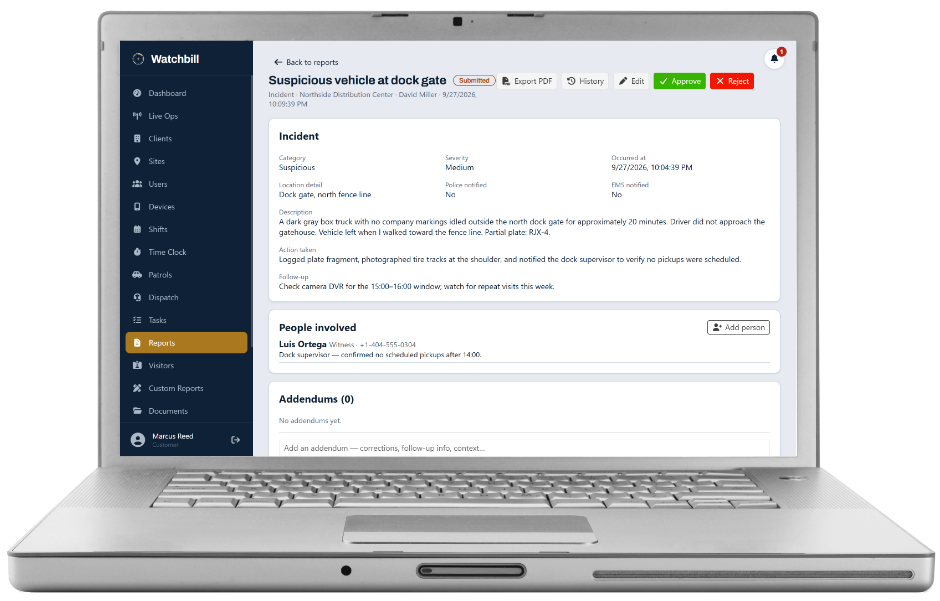
Incident reports with the evidence attached
Category, severity, narrative, action taken, the people involved — victims, witnesses, suspects, responding officers — and attachments: photos, video, audio statements, PDFs. Submission can require GPS, QR or NFC verification per site, so the report itself says where it was written. Guards keep a draft editable until it's submitted; nothing is lost to a closed app.
Incident categories are your vocabulary, not a fixed menu. A hospital client can have "Patient elopement" without your retail clients ever seeing it.
Daily activity reports, logged as they happen
The DAR is a running log: patrols, escorts, equipment checks, observations, each entry GPS- and time-stamped at the moment it's logged, with optional photos. End of shift, the guard adds a summary and submits. Timestamps land where the events actually happened, instead of being reconstructed at 6 a.m.
The compiled DAR: the whole shift, in order
The guard only types what the system can't see. Everything else they did is already on record — the clock-in and clock-out, breaks, welfare check-ins, every checkpoint scan with its tag name, patrol stops, the incident reports they filed, checklist items, visitors they checked in, parking actions, each dispatch status they set, pass-downs, panic alerts. Open the DAR and Watchbill merges all of it with the typed entries into one time-ordered shift timeline: clocked in 15:22, entry 15:52, dispatch on scene 21:33, resolved 21:44, pass-down 22:22, clocked out 23:22.
Nothing is copied or retyped — the timeline is assembled from the records each feature already keeps, so a dispatch update that lands after the guard submitted still shows, and the guard's own words are never touched. Download it as a one-page PDF, or email it to the client straight from the report with the PDF attached and the send logged. When a property manager asks what happened Saturday night, the answer is the system's record of the shift, not a narrative written at 6 a.m.
The site day log: one site, one day, every officer
The compiled DAR answers "what did this officer do on this shift". The day log answers the question a property manager actually asks: "what happened at my building on Tuesday?" Pick a site and a day and Watchbill lists the shifts that were scheduled, who clocked in and for how long, and every event the system recorded there — clock events, check-ins, every checkpoint scan, patrol stops, every report submitted, visitors, parking, each dispatch update, welfare checks, watch-mode timers — in time order, with the officer on each row. Filter to one officer, search the day, and download it as a PDF.
Review before the client sees it
Draft → Submitted → Approved or Rejected. A rejected report goes back to the guard with your notes for fixing and resubmission. Approval is the gate to the client portal — clients only ever see approved reports, unless you choose otherwise per client. Review from the web or with one tap in the Command app.
Edit vs. addendum — the difference that makes it evidence
Two needs, two tools. Edit fixes a mistake in the original (a misspelled witness name) and stores a before-and-after snapshot in the history. Addendum adds information after the fact — "police report number arrived: #24-1187" — without touching the original. Addendums are append-only and can never be edited or deleted, which is what makes the report defensible. They can carry their own attachments and be marked internal-only, hidden from the client.
- Every report has a complete change history
- PDF export for clients, insurers and counsel
- Cross-guard access is a setting: own reports only, site reports read-only, or read-and-addendum
Your own report forms
Design the forms your clients are used to: text, number, yes/no, date, select, photo and video fields with minimum and maximum counts, camera-only capture where you need to know the photo was taken on the spot, and signatures. Publish a form to the sites you choose and it appears in the Field App. Forms are versioned: change one and old submissions always render against the version they were filled in with. A form change never rewrites history.
Questions owners ask
Can a guard change a report after it's approved?
No. After approval, corrections go through the office and new information goes in as an addendum, which is append-only. That's deliberate.
Can clients see everything?
Only approved reports for their own sites, read-only — plus patrol visits, the visitor log and documents you share. Internal-only addendums stay internal.
Does the guard have to log every scan and visitor in the DAR?
No. Scans, patrol stops, visitors, dispatch updates and the rest are already recorded by those features. The compiled DAR merges them with the guard's typed entries automatically, so the guard logs observations and the system supplies the rest.
Can a report be tied to a dispatch call?
Yes. A report written from a call in the Field App is attached to the call automatically, and a job type can require one before the call can be closed.
Can I keep using my existing report format?
Rebuild it in the form builder — fields, photos, signatures — and publish it to the sites that use it. Different clients can have different forms.
File one incident report with real evidence
Free 30-day trial with no card required. Start with one site and add the rest when you're ready.
Start free trial Request a demo